Client Parsing?
- Lyanic
- Offline
- Junior Member
- Posts: 22
- Thank you received: 1
I don't know if it's a protocol issue, improper handling of EOL characters, or something else. My code sends "\r\n" for linebreaks, and supports the following protocols: ANSI, ATCP, MCCP1/2, MSDP, MSP, MXP, NAWS, TTYPE, UTF8, and xterm256.
Please Log in or Create an account to join the conversation.
- plamzi
-

- Away
- Administrator
- Posts: 285
- Thank you received: 42
Lyanic wrote: Someone logged into 7th Plane yesterday from the MUD Portal web client, complaining of odd display issues. I checked it out myself, and it seems to be inserting extra EOL characters, which wreaks havoc on ASCII art and maps.
I don't know if it's a protocol issue, improper handling of EOL characters, or something else. My code sends "\r\n" for linebreaks, and supports the following protocols: ANSI, ATCP, MCCP1/2, MSDP, MSP, MXP, NAWS, TTYPE, UTF8, and xterm256.
Try now. I don't have time to get to the bottom of the issue but I added a workaround.
If you want to help track this down, take a look at the .out window and "ui.js" with something like Firebug. I saw two linebreaks in the welcome screen art where there should be one. The extra one ends up in a span tag with nothing but whitespaces behind it.
The workaround is at line 1517 ATM:
t = t.replace(/<span(.+?)>\n( +?)</g,'<span$1>$2<');Please Log in or Create an account to join the conversation.
- plamzi
-
- Away
- Administrator
- Posts: 285
- Thank you received: 42
Please Log in or Create an account to join the conversation.
- Arynth
- Offline
- New Member
- Posts: 7
- Thank you received: 0
As for MXP, it only sends it on certain lines, not on all lines like this, and only if it is turned on through negotiation. If it isn't enabled, it will not be sent. Same for any other Out-of-band data we send (MSDP, ATCP, etc).
Please Log in or Create an account to join the conversation.
- plamzi
-
- Away
- Administrator
- Posts: 285
- Thank you received: 42
Arynth wrote: I know the mud sends a format clear on each new line, so that might be causing it, but I will have to double check the code and see.
Sounds like a good lead. Let me know what that looks like.
Please Log in or Create an account to join the conversation.
- Arynth
- Offline
- New Member
- Posts: 7
- Thank you received: 0
The who list and in game maps are the easiest to see it, and are both locations where there is only one /r/n sent per line, so it shouldn't be doing anything odd there. Do you know of an easy way to see the raw data coming from the mud to your client? Just trying to track down where these extra returns are.
Oddest thing: the html source code (Chrome on OSX) only has \n's between the span elements in the Divs. I know we send \r\n, but these only have \n. I didn't see where you are parsing those out, though I admit to not looking very hard either (at work).
Please Log in or Create an account to join the conversation.
- Tijer
-

- Offline
- Senior Member
- Posts: 41
- Thank you received: 0
Please Log in or Create an account to join the conversation.
- plamzi
-
- Away
- Administrator
- Posts: 285
- Thank you received: 42
The stuff that's causing the extra line breaks at the welcome screen is an ANSI color sequence: [1;37m[0m\n
Can you take this further? Thanks.
Please Log in or Create an account to join the conversation.
- plamzi
-
- Away
- Administrator
- Posts: 285
- Thank you received: 42
Tijer wrote: my listing has suddenly stopped letting me connect via here... dont think i edited anything.. dunno..
Fixed. Not sure how it broke.
Please Log in or Create an account to join the conversation.
- Tijer
-
- Offline
- Senior Member
- Posts: 41
- Thank you received: 0
 ..... strange issue tho.. extra lines between everything.. and some colors not displaying properly... My MUD utilizes kavirs mud protocol snippet. so i dont know if that is causing issues
 Please Log in or Create an account to join the conversation.
- plamzi
-
- Away
- Administrator
- Posts: 285
- Thank you received: 42
Tijer wrote: thanks
Will sort these issues out quickly. Up until a few days ago, the app was only pointing to my game, so the parsing code is still very lazy and gimmicky.
I have a theory about how that button broke and how to prevent it from happening again. Thanks for catching it.
Please Log in or Create an account to join the conversation.
- plamzi
-
- Away
- Administrator
- Posts: 285
- Thank you received: 42
Please Log in or Create an account to join the conversation.
- Tijer
-
- Offline
- Senior Member
- Posts: 41
- Thank you received: 0
only thing that isnt is the Dark White ANSI sequence... (aka Default)
Please Log in or Create an account to join the conversation.
- Tijer
-
- Offline
- Senior Member
- Posts: 41
- Thank you received: 0
Please Log in or Create an account to join the conversation.
- Tijer
-
- Offline
- Senior Member
- Posts: 41
- Thank you received: 0
Please Log in or Create an account to join the conversation.
- Lyanic
- Offline
- Junior Member
- Posts: 22
- Thank you received: 1
P.S. Thanks for all the quick updates to the site/client, and for adding an image back to my game listing. I like the direction of this site so far.
Please Log in or Create an account to join the conversation.
- plamzi
-
- Away
- Administrator
- Posts: 285
- Thank you received: 42
Lyanic wrote: it's a little more "orange" than I'm used to from most other clients. That's very subjective and nitpicky, though. Is there any chance of supporting xterm256 in the future?
Eventually, we'll have a module for customizing the basic colors, another module for xterm256, the whole nine. I'm making a push to get us to a point where multiple contributors can customize the app via the website, at the same time.
Please Log in or Create an account to join the conversation.
- Tijer
-
- Offline
- Senior Member
- Posts: 41
- Thank you received: 0
Please Log in or Create an account to join the conversation.
- plamzi
-
- Away
- Administrator
- Posts: 285
- Thank you received: 42
Tijer wrote: the updates to the client to use mxp are messing up on my mud.... my mxpified exits, are merging with my prompt.. i think it may be something to do with how KaVir's snippet parses mXp.... ofcourse i could be totally wrong....
The plugin is very first-draft. I'll take a look later tonight.
Please Log in or Create an account to join the conversation.
- Tijer
-
- Offline
- Senior Member
- Posts: 41
- Thank you received: 0
Please Log in or Create an account to join the conversation.
- plamzi
-
- Away
- Administrator
- Posts: 285
- Thank you received: 42
Tijer wrote: not a problem just thought id let ya know...
Easy fix. Take a look?
Please Log in or Create an account to join the conversation.
- plamzi
-
- Away
- Administrator
- Posts: 285
- Thank you received: 42
Please Log in or Create an account to join the conversation.
- Tijer
-
- Offline
- Senior Member
- Posts: 41
- Thank you received: 0
Please Log in or Create an account to join the conversation.
- dentin
-

- Offline
- Junior Member
- Posts: 35
- Thank you received: 0
Please Log in or Create an account to join the conversation.
- Tijer
-
- Offline
- Senior Member
- Posts: 41
- Thank you received: 0
Please Log in or Create an account to join the conversation.
- plamzi
-
- Away
- Administrator
- Posts: 285
- Thank you received: 42
dentin wrote: I can't either; I click on the game name and it does something, but when I click on the actual play button, nothing happens. It just sits there. How do you make the client start the connection?
Does it work when you're not logged into the site? Which browser? Do you see any js errors?
Please Log in or Create an account to join the conversation.
- dentin
-
- Offline
- Junior Member
- Posts: 35
- Thank you received: 0
I have to leave for an extended period of time; sorry if I don't respond further for a few days.
-dentin
Alter Aeon MUD
www.alteraeon.com
Please Log in or Create an account to join the conversation.
- plamzi
-
- Away
- Administrator
- Posts: 285
- Thank you received: 42
Please Log in or Create an account to join the conversation.
- Tijer
-
- Offline
- Senior Member
- Posts: 41
- Thank you received: 0
Please Log in or Create an account to join the conversation.
- Lyanic
- Offline
- Junior Member
- Posts: 22
- Thank you received: 1
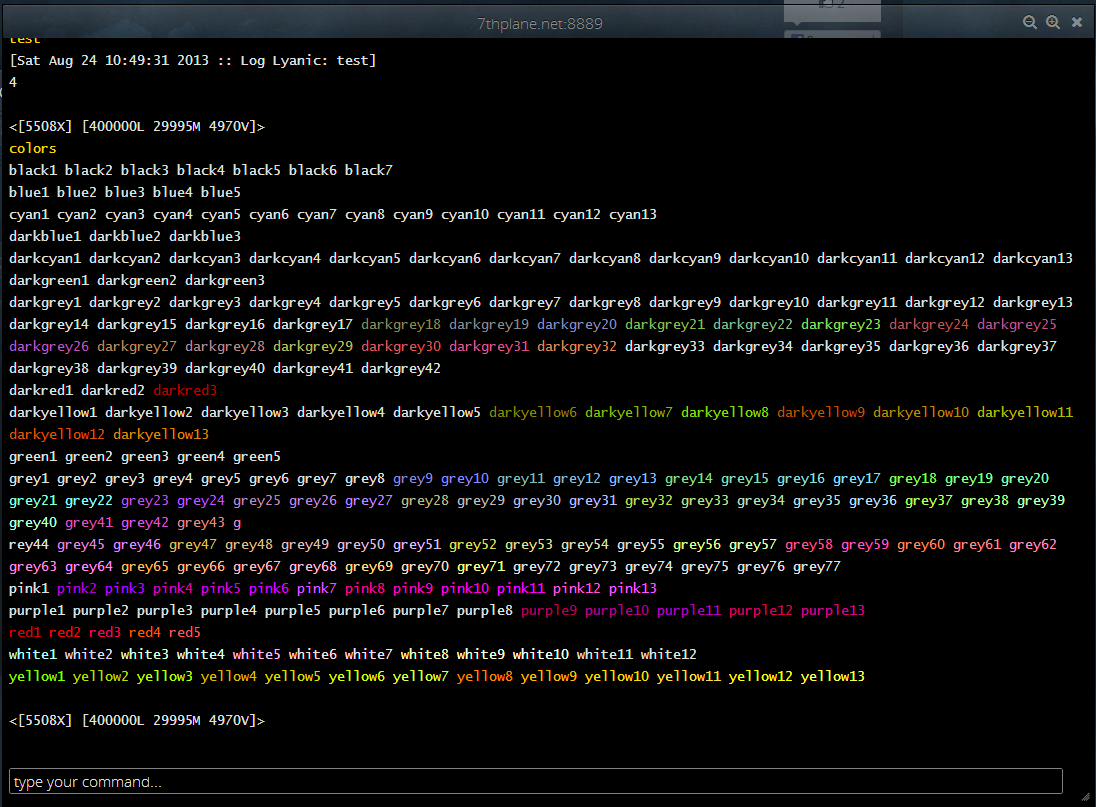
You can ignore the names (aside from a description of approximately what color they should be), since those are just my internal tags for them. The issue is that some show up, and some don't at all - they're just default text color.
Also, should MXP clickable links be working yet? Specifically something like this: #<send href="help combat">COMBAT#</send>
If you want something to test against, you can check the 'colors' and 'areas' commands.
Of course, it's possible that some of these issues are on my end. I have a somewhat complex client negotiation process on connection. I saw that you added a TTYPE response to identify the MUDPortal client. I haven't added any special code to handle that yet.
Please Log in or Create an account to join the conversation.
- plamzi
-
- Away
- Administrator
- Posts: 285
- Thank you received: 42
MXP clickable links should be working. Let me know where to see one that doesn't.
Please Log in or Create an account to join the conversation.
- Lyanic
- Offline
- Junior Member
- Posts: 22
- Thank you received: 1
As for MXP clickable links: the 'areas' command. However, I think the issue is that MXP still isn't getting negotiated correctly. I'm going to run some tests on my end, and I'll get back to you about that.
Please Log in or Create an account to join the conversation.
- Tijer
-
- Offline
- Senior Member
- Posts: 41
- Thank you received: 0
Would also appear that the client is reporting its self as MUDPortal Client 1.0, when it should be MudPortal Client, and have 1.0 in the version field, you can see this when you type "FInger (yourname)" in the mud. Also MXPVersion is not being set, not sure if this is an actual requirement or not.
I like hades_kane, have a "colorlist" command which pretty much works exactly the same as his, theres some wierd stuff happening with the background colors, with random characters appearing in there....
Also i am seeing strange characters when the MUD is trying to detect client, this MAY be due to the way i have my client detection working...
Am pretty certain clickable MXP linkes USED to work, but they werent actually ending properly.. so it was making everything an MXP link after being set!
The Client is coming along nicely, theres just a few niggles left, but seeing as its only been 2 weeks since its been active, good work! Can't wait to see what else you are going to be doing with it
Please Log in or Create an account to join the conversation.
- plamzi
-
- Away
- Administrator
- Posts: 285
- Thank you received: 42
Your test MUD seems to be sending links that are not in compliant MXP format. It wraps HTML <a> tags in MXP sequences. The client would understand those only if each < and > is escaped and the MXP wrapper is removed.
Strange characters during detection should go away soon. Client will get better at identifying itself and its MXP version.
There should be no more breaking of ASCII escape sequences, e. g. when you type the "colorlist" command.
Please Log in or Create an account to join the conversation.
- Lyanic
- Offline
- Junior Member
- Posts: 22
- Thank you received: 1
Yeah, MXP isn't getting negotiated for 7th Plane. I'm still not sure why. It's possible the issue is partly on my end, but it works fine with all the major desktop clients that support MXP.Lyanic wrote: As for MXP clickable links: the 'areas' command. However, I think the issue is that MXP still isn't getting negotiated correctly. I'm going to run some tests on my end, and I'll get back to you about that.
Also, when I connect with the MP client now, I get an extraneous 'U' above the client detection line. I'm not sure where that's coming from.
Please Log in or Create an account to join the conversation.
- Tijer
-
- Offline
- Senior Member
- Posts: 41
- Thank you received: 0
Coming along really nicely tho, MUCH MUCH MUCH better than the FMUD client that people were using to connect to MUDs via websites! Please Log in or Create an account to join the conversation.
- plamzi
-
- Away
- Administrator
- Posts: 285
- Thank you received: 42
Test MXP negotiation for 7th Plane now?
Tijer,
Which background colors (ANSI) are not working?
Please Log in or Create an account to join the conversation.
- Tijer
-
- Offline
- Senior Member
- Posts: 41
- Thank you received: 0
Please Log in or Create an account to join the conversation.
- plamzi
-
- Away
- Administrator
- Posts: 285
- Thank you received: 42
Tijer wrote: i think its the white colour code being regarded as a dark colour thats causing it to not work properly, as with ansi cant use dark colours with background ansi!!
Can you guide me to a specific test case where I can see the problem? Thanks.
Please Log in or Create an account to join the conversation.
- Lyanic
- Offline
- Junior Member
- Posts: 22
- Thank you received: 1
Still no. The extraneous 'U' character is gone, though.plamzi wrote: Lyanic,
Test MXP negotiation for 7th Plane now?
Please Log in or Create an account to join the conversation.